Navigation menu
hello Guest

Instructor Manual
Set Announcement
You can set announcements for your students enrolled in the section, the announcements would be visible to students on their section’s dashboard. To set announcements, click the Announcement tab and click the expand button next to the End Date heading. Enter the desired message/text, which you want to announce, under the Announcement heading. You can set start and end date for your announcement under the Start date & End date heading. Use the calendar to set desired dates.
_0002G5.gif)
Figure 2.8: Add Announcement Button with Announcement Message Box
To delete any announcement, click the delete button parallel to the announcement.
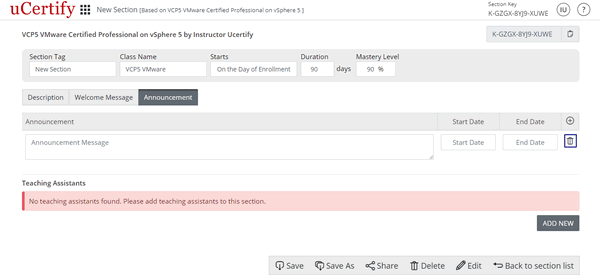
Figure 2.9: Setup Page with Delete Announcement Button
Figure 2.8: Add Announcement Button with Announcement Message Box
To delete any announcement, click the delete button parallel to the announcement.
Figure 2.9: Setup Page with Delete Announcement Button